For people living or working overseas, a map app is part of the daily routine. It helps with commuting, deliveries, meetings, and finding essential services in an unfamiliar area. If you are considering a Huawei phone, you may naturally ask: does huawei have google maps? Google Maps can be installed on supported Huawei devices through AppGallery, but it is worth setting up the wider app environment at the same time.
Use the Official Installation Route
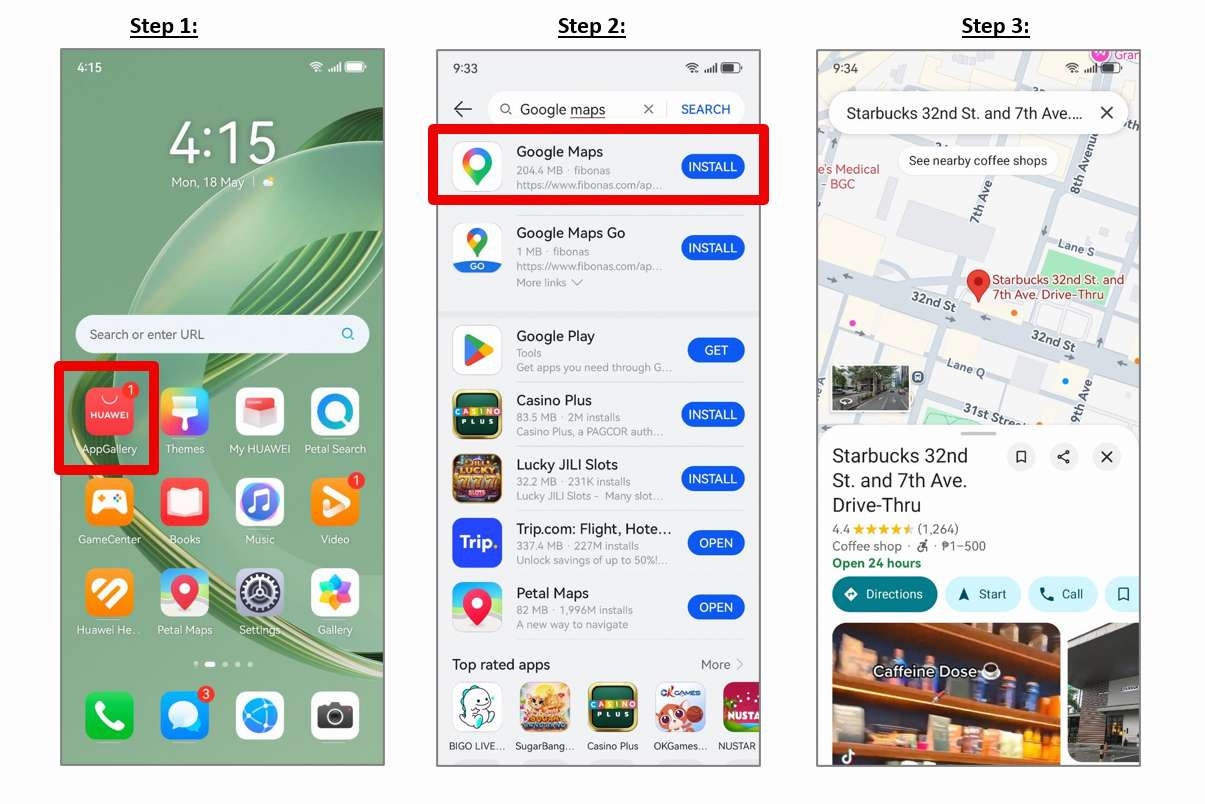
Begin with HUAWEI AppGallery rather than an unofficial APK site. Search for Google Maps, open the result, and tap Install. Huawei’s guide to does huawei have google maps outlines the basic process and is the best reference point when the AppGallery screen presents additional instructions.
Google Maps installation flow on a Huawei phone.
After installation, open the app and test search, directions, location tracking, and account sign-in. A successful installation does not always guarantee that every feature behaves identically on every phone, so check the functions that matter to you.
Match Your Account and Region Settings
App availability may change with the device model, software version, and selected region. Make sure the HUAWEI ID region reflects where you live or travel, particularly when looking for local transport, shopping, and banking apps.
Some services also require a local phone number, SIM card, payment method, or identity check. These requirements come from the app provider and may apply even when the app itself installs without difficulty.
Add Local Apps Safely
Search AppGallery for the services used in your destination. Prioritise public transport, ride-hailing, airlines, food delivery, messaging, and emergency information. If an app is missing, use the provider’s official website or mobile web service.
Check the developer name and requested permissions before installing. Unknown download sites create unnecessary risk, especially when an app handles location history, card details, or personal documents.
Fix Common Navigation Problems
If the map cannot find your position, turn on Location and confirm that the app has permission to use it. If routes load slowly, check mobile data access and network quality. For delayed alerts, review battery optimisation and background activity settings.
Keep the phone system, AppGallery, and installed apps current. Clearing the app cache or reinstalling from AppGallery can resolve a failed update, but saved offline data may need to be downloaded again.
Plan for More Than One Map
The most reliable approach abroad is to keep a backup. Petal Maps or a well-supported local map can cover situations where one service lacks regional data or cannot connect. Save important addresses separately and download offline areas when possible.
The practical answer to does huawei have google maps is that supported Huawei phones can access it through AppGallery. Set it up early, verify the features you rely on, and build a complete local-app toolkit rather than depending on a single application.